Every Amazon seller knows the sequence. A hero ASIN takes off. Ads keep driving traffic. Stock drops faster than the reorder can land. And then the listing goes dark, taking rank, Buy Box momentum, and the ad dollars that got you there with it.
The reverse hurts too: units that aren’t moving, sitting in FBA while storage fees stack up month after month.
Until now, InventoryOptimizer.ai told you this was coming. Starting today, it can act on it.
We’re introducing two new features for Amazon sellers, both driven by the same per-ASIN demand forecast you already use to plan replenishment: Automated Advertising and Inventory-Driven Repricing. Both are free for a limited time during our beta.
Automated Advertising: pause ads before you run out, restart them when stock lands
Advertising and inventory have always lived in separate tools, run by separate people, on separate schedules. That’s why the most common stockout story is also the most avoidable one: a campaign that kept spending right up to zero.
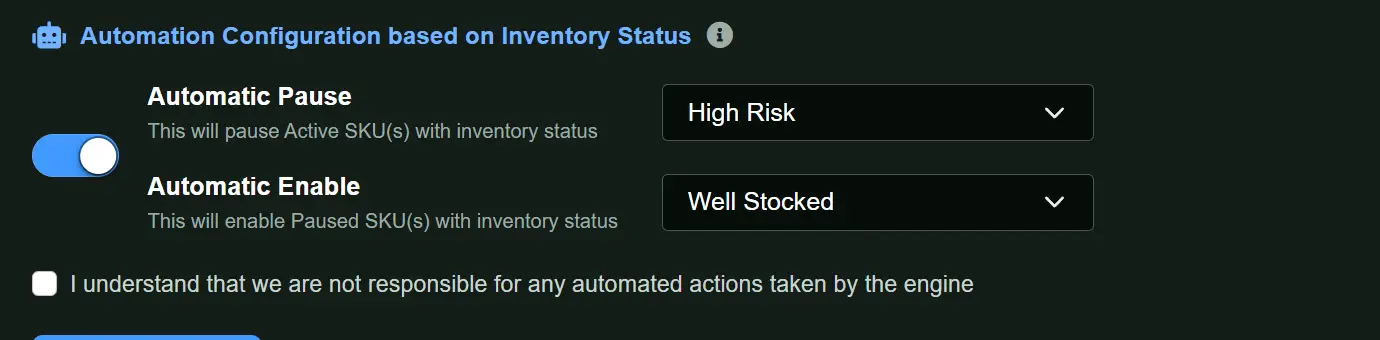
Automated Advertising closes that gap. InventoryOptimizer.ai continuously compares each ASIN’s inventory position against its forecasted demand and lead time, and adjusts ad delivery to match:

- Approaching stockout: ad delivery for that ASIN is automatically paused, so you stop paying to accelerate a sellout you can’t replenish in time.
- Inventory replenished: ad delivery is automatically re-enabled once stock is back at a healthy level, so campaigns resume without anyone remembering to flip the switch.
- Per-ASIN, not per-account: decisions are made item by item, so a stockout risk on one product never affects spend on the rest of your catalog.
You set the rules. The forecast does the watching.
Inventory-Driven Repricing: when pausing ads isn’t enough
Sometimes organic demand alone is enough to drain a listing before the next shipment arrives. Pausing ads slows the bleed, but it doesn’t stop it. That’s where repricing comes in.
Inventory-Driven Repricing is a second line of defense that kicks in when pausing advertising hasn’t slowed sales velocity enough to protect your stock position. It works in both directions:
- Running dangerously low: the price is increased to slow sales velocity and stretch remaining units until the reorder lands, protecting the listing’s availability, rank, and Buy Box history.
- Excess inventory: the price is lowered to move units that are sitting too long, before aged-inventory and long-term storage fees erode your margin.
Both actions are triggered by the same forecast that drives your purchase-order recommendations, so pricing decisions reflect what’s actually going to sell, not just today’s stock count.

Stay in compliance across every marketplace
Price changes on one channel can’t happen in isolation. Every repricing action generates an easily exportable pricing update for all major marketplaces, so you can push consistent prices everywhere you sell and stay in line with marketplace pricing policies. No manual reconciliation, no mismatched listings.
How the two features work together
Think of it as an escalation ladder, run automatically per ASIN:
- Forecast flags an ASIN as at risk of stockout (or excess).
- Advertising is paused (or continues, if inventory is healthy).
- Repricing engages only if velocity still needs to change: up to protect low stock, down to clear excess.
- Restore: ads re-enable and pricing normalizes once inventory returns to a healthy level.
The result is what InventoryOptimizer.ai has always been built for: right product, right quantity, right time, with less cash trapped and fewer stockouts. The difference is that now the system doesn’t just recommend the fix. It executes it.

Available now for Amazon FBA, AWD, and FBM sellers
Both features are available starting today to InventoryOptimizer.ai customers with a connected Amazon account, and they’re free for a limited time during our beta.
Existing customers: enable Automated Advertising and Inventory-Driven Repricing from your account settings.
New to InventoryOptimizer.ai? Connect your Amazon account and see which ASINs are at risk of stockout, and which are quietly eating your cash, before you place your next PO.